
Home Security Camera: Camerito
TappyTaps s.r.o.House & Home
4.429.00 Reviews
- Version
- 4.10.0
- Installs
- 50.00K
- Age Rating
- Everyone
Screenshots
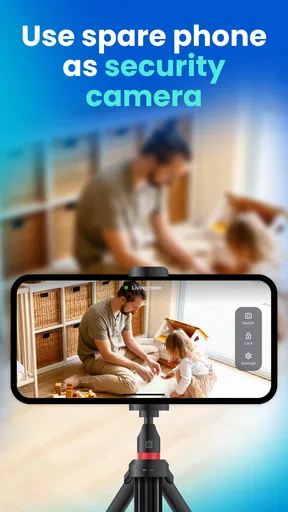
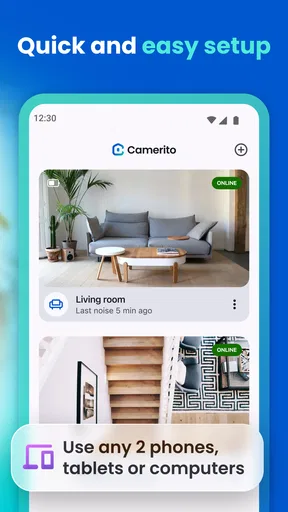
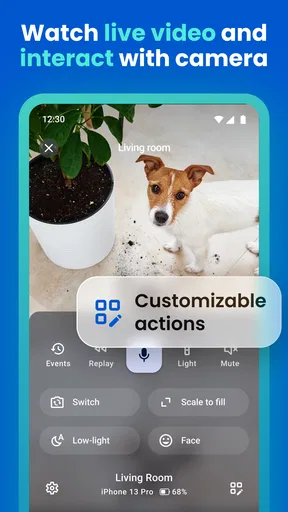
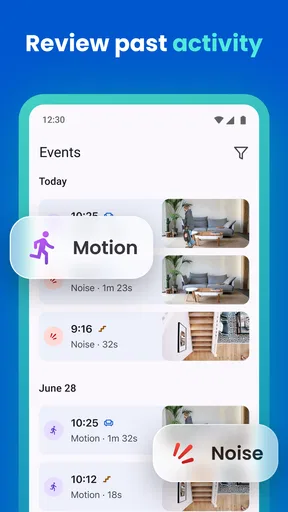
Our Review of Home Security Camera: Camerito
 Analysis by Appyee
Turning an unused phone into a way to check on home can sound more complicated than it is. Camerito: Home Security Camera is built around that simple idea: keep one phone pointed at an area you care about and use another to view it, receive alerts, and talk through two-way video. I like the appeal most for people who want a temporary or low-cost check-in, rather than a full replacement for a dedicated security system.
Getting Started with Camerito
First things first, let's talk about setting it up. I'm not exactly a tech wizard, but Camerito made the whole process surprisingly easy. All you need is an old smartphone and a little bit of patience. Download the app on both your primary device and the old phone you plan to use as a camera. That’s it! You’re halfway there.
The interface is intuitive, which I appreciate because who has time to read a manual these days? You just select the camera mode on the old phone and viewer mode on your main one. Connect both devices to the same Wi-Fi network, and boom, you're live-streaming whatever your camera phone is pointed at.
Make the First View Useful
My practical advice is to choose the camera’s position before you start judging the picture. Put the spare phone somewhere stable, with a clear view of one specific area: a doorway, a pet’s usual resting place, or the room where a delivery is likely to be left. A broad view of a whole home sounds tempting, but one well-framed corner is often more useful than a distant image of everything.
Then check the image from the viewer phone while you are standing where you would normally be when away from home. That simple test helps you spot glare, a blocked lens, or a view that is too low. If you need to move the phone, adjust it before relying on alerts; motion detection can only help with movement the camera can actually see.
Features That Stand Out
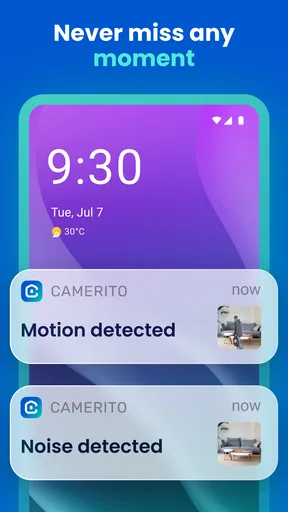
One of the coolest features is the motion detection. Imagine getting an alert on your phone when something moves in front of the camera. Pretty nifty, right? You can adjust the sensitivity settings so that you’re not constantly being bombarded with notifications every time a leaf blows by.
A useful way to tune that setting is to begin with the camera aimed at the actual area you want to monitor, then observe how often normal activity triggers alerts. A busy hallway may need a different sensitivity choice from a quiet room. I would treat alerts as prompts to look in, not as proof that an event is dangerous; movement tells you that something changed, not why.
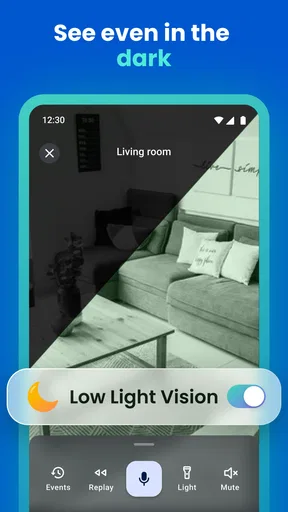
Another handy feature is the night vision. Okay, so it’s not like those infrared cameras you see in spy movies, but it does the job well enough in low light. I tested it at night and, while the footage isn't crystal clear, it’s definitely usable.
That makes placement important after dark too. Before settling on a spot, check the view at the time you expect to use it: a window, reflective surface, or a lamp in the frame can affect how useful the picture feels. If identifying small details in darkness is essential, I’d compare the result with a purpose-built camera rather than assume a repurposed phone will provide the same image.
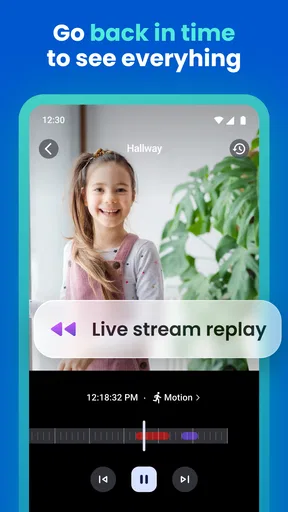
For those moments when you want to check in on your pets or just make sure everything’s okay at home, the app offers real-time streaming. Plus, you can save recordings locally or in the cloud, which is great for reviewing any incidents later.
Using the App Daily
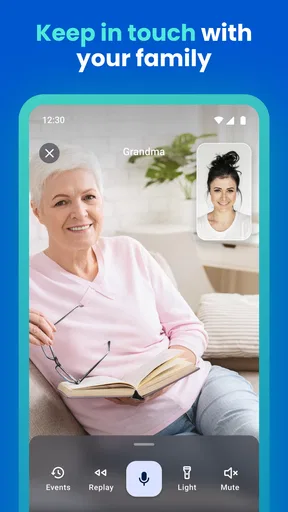
I’ve been using Camerito for a couple of weeks now, and it’s become a part of my daily routine. I especially like the two-way audio feature. It’s perfect for scaring the living daylights out of my cat when she’s scratching the furniture. Jokes aside, it’s also useful for communicating with family members at home.
For a first meaningful test, I’d try that audio while both phones are nearby: check that the camera is aimed correctly, open the viewer, and speak from the viewing device. It’s a low-pressure way to learn where the sound comes from and how quickly you can reach the live view. With a pet, use a calm voice first; a sudden sound from an unattended phone can confuse an animal rather than reassure it.
A realistic routine could be checking the living room before heading home, then using the talk-back feature if a family member is there and needs your attention. For a pet, a short check can help you see whether it is settled, but I would not treat a phone camera as a substitute for direct care or a dependable way to respond to an emergency.
Battery life is a concern, though. Using an old phone as a camera means it’s plugged in most of the time. I’ve set it up near a power outlet, so it’s not a big issue for me, but it’s worth considering if you’re thinking about using it in a spot without easy access to power.
That trade-off is central to the idea: the spare phone saves you from buying another camera, but it still needs a sensible place to sit and a reliable power arrangement. I would use a stable surface or stand, keep the charging cable from pulling the phone out of position, and avoid putting the device somewhere it could be knocked down. A quick check of the framing after reconnecting power can prevent a camera that is technically on but pointed at a wall.
What to Expect from a Phone-Based Camera
It helps to think of this as a flexible check-in tool rather than a complete home alarm. The camera phone can show you a view and make it easier to notice movement, but the usefulness of that view depends on its position, lighting, network connection, and whether the phone remains powered. If you need continuous coverage of several rooms, a single spare handset will not offer the same convenience as a set of installed cameras.
That distinction also matters for security. I would not rely on a DIY phone setup as the only protection for valuable belongings or as the system responsible for urgent monitoring. It is better suited to ordinary reassurance: checking whether a pet is in the room, seeing if someone has entered a monitored area, or keeping an eye on a temporary situation while you are elsewhere.
Before leaving it in place, make a brief test part of your routine. Open the viewer from the location where you expect to use it, check that the picture is live, and confirm that the camera has not shifted. If you plan to use saved clips, learn where the app makes them available and choose the storage option that suits your needs. The app supports local and cloud recording, while in-app purchases range from $2.99 to $17.99 per item, so I would check the options in the app before assuming a particular recording arrangement is included for free.
Where Camerito Fits Among Home Camera Options
Compared with buying a dedicated indoor security camera, the main attraction here is reuse: an old phone you already own can become the camera device. That can make sense for a renter who wants to watch one room for a while, someone checking on a pet during a short outing, or a household that wants a temporary view while rearranging or repairing part of the home. It is less appealing if you want a fixed, always-on installation with the convenience and purpose-built hardware of a dedicated camera.
Compared with simply making a video call to someone at home, motion alerts and saved clips give this approach a more camera-like role. But a call is often the simpler choice when another person is available to answer, while a dedicated camera is the stronger choice when you want a permanent setup or broader coverage. I see Camerito as the middle ground: more useful than a one-off call for checking a space, but not a replacement for a complete security system.
There is also a practical privacy choice in deciding what the camera sees. Aim it at the area you actually need to check rather than toward a private corner or a place where people expect not to be recorded. Let household members know when a camera is in use, and use a narrower view if that still answers your real question. A well-chosen angle can make the setup more comfortable for everyone while keeping the feed focused.
Who Will Get the Most from It
I think this app is most useful if you already have a spare smartphone, a convenient place to keep it plugged in, and one clear reason to monitor a particular spot. It can be a straightforward first step for someone curious about home monitoring because camera mode, viewer mode, live viewing, alerts, and two-way audio all fit into a setup using phones rather than extra camera hardware.
I would skip it if you need dependable coverage across multiple rooms, a camera that can be installed and forgotten, or footage that must clearly show fine details in poor light. It may also frustrate you if the only phone available is your everyday handset: using that device as the camera means you cannot freely carry it around as usual. In those cases, a purpose-built indoor camera or a broader security setup is a more suitable starting point.
For a household with an older phone and modest expectations, the free app is easy to try. Camerito is from TappyTaps s.r.o., has an Everyone age rating, and its current version is 4.2.1; it requires Android 7.0 or later. It has a 4.3 average from around 312 ratings, with 10K+ installs. Those figures suggest there is an established audience, but I would still judge it by whether your own two-phone setup stays convenient in the place you want to monitor.
Final Thoughts
So, what's the verdict? Is Camerito worth your time? I’d say yes, especially if you’ve got an old phone gathering dust. It's an affordable way to add an extra layer of security to your home without shelling out big bucks for a dedicated security system.
Sure, it’s not perfect. The video quality could be better, and battery management is something to keep an eye on, but for what it is, Camerito: Home Security Camera is a solid app. It’s a clever use of old tech that’s both practical and easy to implement. If you’re looking to dip your toes into home security, give it a shot. You might just find it’s exactly what you need.
Privacy and Permissions
See what permissions an app requests and how it handles your data.
- Location
- approximate location (network-based), precise location (GPS and network-based)
- Photos/Media/Files
- read the contents of your USB storage, modify or delete the contents of your USB storage
- Storage
- read the contents of your USB storage, modify or delete the contents of your USB storage
- Camera
- take pictures and videos
- Microphone
- record audio
- Wi-Fi connection information
- view Wi-Fi connections
- Other
- view network connections, pair with Bluetooth devices, allow Wi-Fi Multicast reception, control flashlight, full network access, change your audio settings, draw over other apps, control vibration, prevent device from sleeping, Google Play license check, read Google service configuration
Verdict
Strengths of Home Security Camera: Camerito
- Simple setup process for quick installation.
- High-quality video streaming for clear monitoring.
- Supports multiple devices for wider coverage.
- Motion detection alerts in real-time.
- Affordable subscription plans available.
Limitations of Home Security Camera: Camerito
- Requires consistent Wi-Fi for optimal performance.
- Limited free features without subscription.
- Occasional lag in live video feed.
- No night vision in basic version.
- App interface can be unintuitive for beginners.
Other Releases by TappyTaps s.r.o.
View All
Bibino Baby Monitor - Baby Cam
Parenting4.5

Baby Monitor 3G - Video Nanny
Parenting4.4
Similar Picks in This Category
View All
Universal TV Remote Control
CodeMatics Media Solutions3.9

AlfredCamera Home Security app
Alfred Systems Inc.4.7

Planner 5D: AI Home Design
Planner 5D4.5

Universal Tv Remote-Cast to TV
One Music Player4.1

Zillow: Homes for Sale & Rent
Zillow Group4.8

99acres Buy/Rent/Sell Property
infoedge.com4.3
Frequently Asked Questions
What features does Camerito offer for home security?
Camerito comes equipped with a range of features designed to enhance home security. These include real-time video streaming, motion detection alerts, night vision, and two-way audio communication. Users can also access cloud storage for recorded footage and receive instant notifications for any suspicious activity, ensuring comprehensive monitoring at all times.
Is Camerito compatible with both Android and iOS devices?
Yes, Camerito is designed to be compatible with both Android and iOS platforms. Users can download the app from the Google Play Store or the Apple App Store. This cross-platform compatibility ensures that users can seamlessly access and control their security cameras from any smartphone or tablet they own.
Does Camerito require a subscription for cloud storage?
Camerito offers both free and paid subscription options for cloud storage. The free plan includes a limited amount of storage, while the paid subscription provides expanded storage capacity and additional features such as extended video history. This flexibility allows users to choose a plan that best fits their needs and budget.
How easy is it to set up Camerito for the first time?
Setting up Camerito is straightforward and user-friendly. The app provides step-by-step instructions to guide users through the installation process. Typically, it involves connecting the camera to a Wi-Fi network and linking it to the app. In-app tutorials and customer support are also available to assist with any issues during setup.
What security measures does Camerito implement to protect user data?
Camerito prioritizes user privacy and data security by employing advanced encryption protocols to safeguard video streams and personal data. The app also features secure login methods, such as two-factor authentication, to prevent unauthorized access. Regular software updates are provided to ensure ongoing protection against potential vulnerabilities.
